Your Google Timeline,
turned into a journey
worth sharing.
Import your Timeline export, pick a trip, choose a style — and watch your route animate into a cinematic video. Rendered entirely on your phone. No account, no cloud, no ads, ever.
Android 8.0+ and iOS 15+ · Coming soon to Google Play & the App Store
From export to shareable video in four steps
No editing timeline, no keyframes to fiddle with. Timeline Generator & Visualizer does the camera work — you just pick the trip and the vibe.
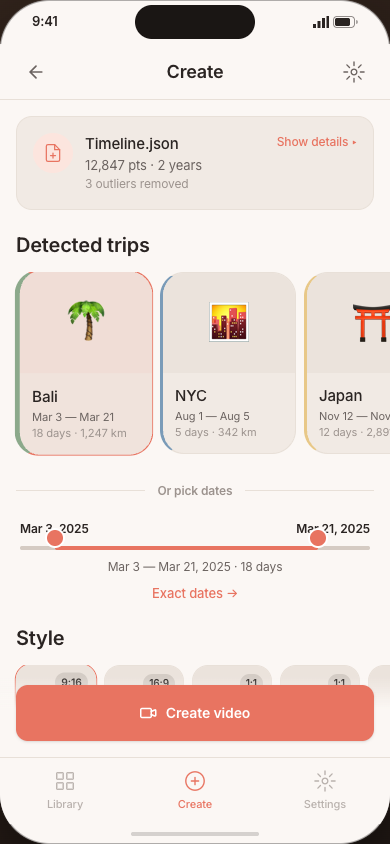
Import your Timeline file
Pick the Timeline.json you exported from Google Maps, or drop it in from your share sheet. No sign-in required.
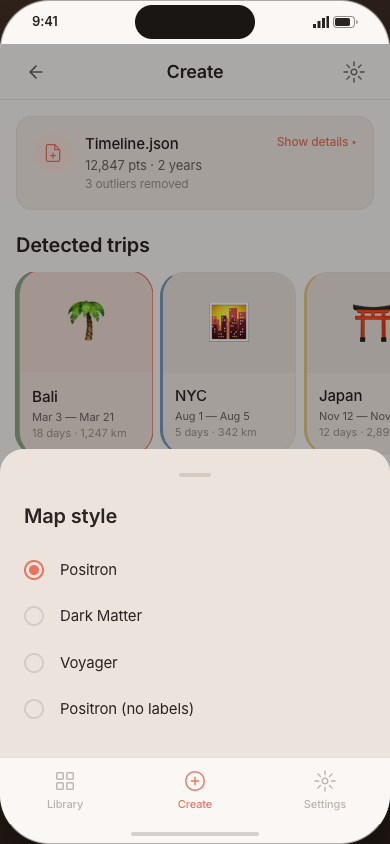
Pick a trip & a style
Timeline Visualizer Generator auto-detects your trips and suggests a date range. Choose a style preset — Reel, Cinema, Square, Postcard, or Data Diary.
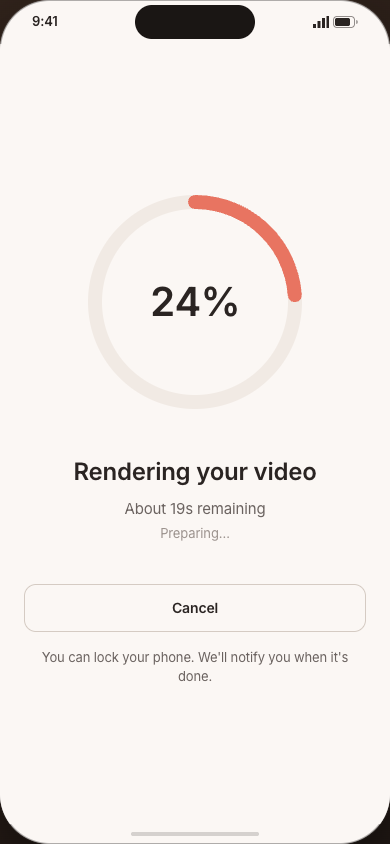
Preview, then render
Scrub through a live preview of the exact frames your video will contain, then render on-device with a live progress ring and ETA.
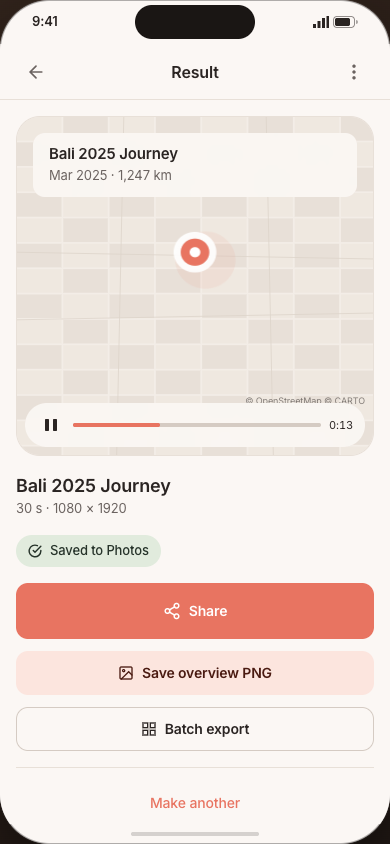
Save and share
Your MP4 saves straight to Photos. Share it to Instagram Reels, TikTok, or WhatsApp Status in a couple of taps.
Everything you need, nothing you don't
Timeline Visualizer Generator ships with sensible defaults for the 80% who just want a beautiful video fast, and a full control panel for the 20% who want to fine-tune every frame.
Trips, found automatically
Timeline Visualizer Generator clusters your points into trips the moment you import — dedupes overlapping segments, filters GPS spikes, and even bridges flight gaps with great-circle arcs.
5 style presets, one tap away
Reel (9:16), Cinema (16:9), Square (1:1), Postcard still, and Data Diary — each a tuned combination of aspect ratio, camera, duration, and compression.
Advanced controls when you want them
Four camera modes, five long-trip compression curves, adjustable trip-detection sensitivity, and a local-framing dead-zone to smooth out commute jitter — all tucked behind one drawer.
Live, scrubbable preview
Drag through the exact frames the encoder will produce before you commit to a render. Change a setting and the preview updates instantly — no guessing, no wasted renders.
Rendered on your phone, not a server
Video encoding runs entirely on-device via MediaCodec (Android) and AVAssetWriter (iOS), with a foreground task and live progress so you can keep using your phone while it renders.
A library that remembers your work
Every render lands in your video library with thumbnail, period, duration, and style. Save named projects to re-render the same trip in a new style with one tap.
Export the way you actually post
Up to 4K resolution, 24/30/60 fps, H.264 or HEVC, plus a 1080×1080 journey-overview still — sized for Reels, TikTok, WhatsApp Status, or your camera roll.
Your Timeline never leaves your phone
No account, no analytics SDK, no crash reporter, no ad network. The only network call the app ever makes is fetching map tiles — and you approve that first.
Built for travelers everywhere
Available in English, Korean, Japanese, Simplified & Traditional Chinese, Spanish, French, German, and Brazilian Portuguese, with km/mi unit switching.
A style for every platform
Each preset bundles the aspect ratio, camera behavior, duration, and compression that suits it best — swap between them without losing your trip selection.
Reel
9:16Full-height vertical, tuned for Instagram Reels, TikTok, and Shorts.
Cinema
16:9Widescreen landscape for YouTube and desktop viewing.
Square
1:1Balanced square crop, perfect for feed posts.
Postcard
stillA single 1080×1080 journey-overview image instead of a video.
Data Diary
customA denser, stat-forward layout for the data-hobbyist crowd.
Your data never leaves your phone
Timeline Visualizer Generator has no server, no database, and no login — there is nowhere for your Timeline data to go except the video you export.
Stays on your device
- App settings & defaults
- Project & video library index
- Map tile cache (100 MB max, auto-evicted)
- Rendered videos (saved to your Photos)
Never collected, never sent
- Your Timeline JSON or any coordinate in it
- An account, an email, or any sign-in
- Analytics, crash reports, or an advertising ID
- Your location — the app never requests location permission
The only network request the app ever makes is fetching map tiles from CARTO to draw the background map — gated behind a consent screen you can decline or withdraw at any time in Settings. Read the full privacy policy.
Frequently asked questions
Timeline Visualizer Generator is launching soon
We're polishing the render pipeline ahead of launch on Google Play and the App Store. Drop us a line and we'll email you the moment it's live — no spam, no other reason to have your address.